Author: admin_madeincn

  • ESP32 MQTT Tutorial: Send Your First Sensor Reading to the Cloud

    MQTT is the lightweight publish/subscribe protocol that powers most DIY IoT. This ESP32 MQTT tutorial takes you from a blank sketch to a board that publishes a sensor reading and listens for commands – using the Arduino IDE and the popular PubSubClient library.

    What you need

    • An ESP32 board (an ESP32-S3 with a display works great and shows live values)
    • Arduino IDE with the ESP32 board package installed
    • The PubSubClient library
    • An MQTT broker (local Eclipse Mosquitto, or a free cloud broker)

    Step 1 – Install the libraries

    Open Library Manager and install PubSubClient by Nick O’Leary. Confirm your ESP32 board appears under Tools > Board. This single dependency handles the MQTT handshake for you.

    Step 2 – Connect to Wi-Fi

    Set your credentials and call WiFi.begin(ssid, password). Wait for WL_CONNECTED before doing anything network-related – a common beginner bug is publishing before Wi-Fi is up.

    Step 3 – Configure the broker

    Create a WiFiClient and a PubSubClient, then client.setServer(broker_host, 1883). Give each device a unique client ID so the broker can tell them apart.

    Step 4 – Publish a reading

    In loop(), read a sensor and call client.publish("sensors/temp", payload). Keep the payload small – a number or a short JSON string is ideal. Remember to call client.loop() often so the client services incoming traffic and keeps the connection alive.

    Step 5 – Subscribe to commands

    Call client.subscribe("device/cmd") and implement the callback. When a message arrives you can flip a GPIO, change a mode, or reply on another topic. This two-way link is what turns a sensor into a controllable device.

    Troubleshooting

    If the connection drops, make your loop non-blocking and add a short-delayed reconnect instead of resetting the chip. For secure deployments use WiFiClientSecure on port 8883. Boards with more RAM, like the ESP32-S3 family, handle TLS comfortably.

    For more board choices, see our ESP32 dev board guides.

    Frequently asked questions

    Which MQTT broker works with the ESP32?

    Any standard broker works: Eclipse Mosquitto, HiveMQ, EMQX, or a free cloud broker. The ESP32 just needs the broker host, port and (optionally) credentials. Port 1883 is plain MQTT; 8883 is MQTT over TLS.

    Can the ESP32 do MQTT over TLS?

    Yes. Use WiFiClientSecure instead of WiFiClient and provide the broker certificate (or skip verification for testing). TLS adds memory cost, so a board with more RAM like the ESP32-S3 is comfortable.

    Why does my ESP32 MQTT connection keep dropping?

    Usually a blocking loop or a watchdog reset. Keep your loop non-blocking, call client.loop() frequently, and implement a reconnect with a short delay rather than a hard reset.

    Related guides

  • FreeClip 2 vs Original FreeClip: What Actually Changed?

    Open-ear clip earbuds are the most comfortable way to keep your ears open to the world while still listening to music, podcasts or calls. The original FreeClip proved the form factor; the FreeClip 2 refines it. This guide compares the two generations so you can decide whether the upgrade is worth it.

    FreeClip 2 vs original FreeClip: the short version

    Both use the same C-shape clip that hooks over the ear without entering the ear canal. The differences are in sound tuning, battery and call clarity rather than the wearing experience. If you already own the first generation and are happy with the fit, the second generation is a meaningful but not dramatic step up.

    Sound: fuller and a touch louder

    The original FreeClip sounded thin at higher volumes. FreeClip 2 adds more low-end body and holds composure as you push the volume, which matters outdoors where open-ear buds fight against ambient noise. It is still an open-ear signature – don’t expect sealed in-ear bass – but the gap to closed designs is smaller.

    Battery life

    FreeClip 2 extends playtime per charge and improves the charging case efficiency. For commuters and runners this means fewer top-ups across a week. Exact figures vary by volume and feature use, so check the product page for current specs.

    Comfort and fit

    The clip mechanism is the star: it distributes weight so you forget you are wearing anything. Both generations share the same gently flexible C-shape, and FreeClip 2 keeps that nothing-in-your-ear-canal feeling that people buy this category for.

    Call quality

    This is where FreeClip 2 pulls ahead most clearly. The upgraded dual-mic array plus AI voice isolation makes you easier to hear on windy sidewalks and busy streets. If you take a lot of calls on the move, that alone can justify the upgrade.

    Price and who should upgrade

    New buyers should simply get FreeClip 2 – it is the better all-rounder. Existing owners of the first generation should upgrade only if call quality or battery are pain points. Either way, browse our earphones & earbuds guides to compare against ANC and open-ear alternatives.

    Frequently asked questions

    Is FreeClip 2 worth upgrading from the original FreeClip?

    If you want noticeably fuller sound, longer battery and clearer calls, yes. The clip design and open-ear comfort are nearly identical, so the upgrade is about audio and endurance rather than fit.

    Does FreeClip 2 have better call noise cancellation than the first generation?

    Yes. The second generation uses an improved dual-microphone array with AI voice pickup, which suppresses wind and street noise better on calls.

    Are FreeClip 2 and the original FreeClip the same size?

    The clip-on shape is almost unchanged, so existing cases and the familiar C-shape fit carry over. FreeClip 2 is only marginally refined in weight distribution.

    Related guides

  • FreeClip 2 with iPhone and Android: Compatibility, Pairing & Tips

    One of the most common questions before buying open-ear earbuds is simple: will they just work with my phone? With FreeClip 2 the answer is yes on both major platforms. This guide covers pairing, switching and a few regional shipping notes.

    Pairing FreeClip 2 with iPhone

    Open the case, put the buds in, and open Bluetooth on your iPhone. FreeClip 2 appears as a standard Bluetooth audio device – tap to connect. On supported iPhones you may see a quick-pair popup; otherwise a manual tap in Settings > Bluetooth does the job. Once paired, the open-ear buds behave like any other Bluetooth headset for music, calls and Siri.

    Pairing FreeClip 2 with Android

    The Android experience is just as straightforward, and on many phones you get fast pairing and the full companion app for gesture and EQ tweaks. Because the buds are open-ear, ambient sound is always audible – there is no transparency mode to toggle, which is the whole point of the design.

    Multipoint: switch between phone and laptop

    FreeClip 2 supports multipoint, so you can stay connected to your phone and a laptop simultaneously. That means a video on the laptop pauses when a call comes in on your iPhone. To enable it, pair both devices and turn on the multipoint toggle in the companion app.

    Shipping to the US, Canada, Australia and Israel

    We ship worldwide with free shipping to the US, Canada, Australia and Israel. A few practical notes:

    • Charging: FreeClip 2 charges over USB-C, so you only need a local USB-C power adapter. No region-specific charger required.
    • Plugs: Israel uses 230V Type H sockets; any standard USB-C charger is compatible. The same applies across North America (Type A/B) and Australia (Type I).
    • Import: Orders to Israel may be subject to local VAT and customs above the de-minimis threshold. We declare accurately and provide tracking so you can clear delivery smoothly.

    Compare open-ear with sealed options in our FreeBuds ANC vs open-ear buying guide if you are deciding between the two styles.

    Frequently asked questions

    Does FreeClip 2 work with iPhone?

    Yes. FreeClip 2 pairs over Bluetooth with any iPhone and supports multipoint so you can stay linked to a laptop at the same time. Some brand-specific touch settings live in the companion app, which is available on iOS.

    Does FreeClip 2 work with Android?

    Yes. On Android you get the full feature set including the companion app, fast pairing on supported devices, and codec handling that the phone supports. Open-ear transparency works regardless of OS.

    Can I use FreeClip 2 in Israel or other countries with different plugs?

    Yes. The earbuds charge over USB-C, so you only need a local USB-C adapter. Israel uses 230V Type H sockets; any standard USB-C charger works. We ship worldwide including the US, Canada, Australia and Israel.

    Related guides

  • ESP32 vs Arduino: Which Should a Beginner Choose in 2026?

    If you are starting in electronics or IoT, the “ESP32 vs Arduino” debate is the first fork in the road. Both are excellent, both are programmed from the Arduino IDE, and both have huge communities. The difference is what each is built for.

    ESP32 vs Arduino: quick comparison

    An Arduino Uno is a simple 8-bit microcontroller great for learning the basics. The ESP32 is a 32-bit, dual-core chip with Wi-Fi and Bluetooth baked in. For any project that touches the network – a sensor that reports to the cloud, a smart-home gadget, a remote display – the ESP32 removes the need for extra modules.

    Processing and memory

    The ESP32 runs at hundreds of MHz with far more RAM and flash than an Uno. That headroom matters when you parse JSON, drive a display, or run a web server on the board itself. An Arduino Uno struggles once you leave blinking-LED territory.

    Wireless: the ESP32’s killer feature

    Wi-Fi and Bluetooth are native on the ESP32. Want to publish a temperature reading to a dashboard? That is a few lines of code. On an Arduino Uno you would buy a separate shield, wire it up, and still fight for memory. This is why the ESP32 dominates modern dev-board projects.

    GPIO and peripherals

    Both expose plenty of pins, but the ESP32 adds peripherals like touch sensors, a DAC, and more UART/SPI/I2C interfaces. The trade-off is that some ESP32 pins have boot-time constraints – a small learning curve that the community documents well.

    Ecosystem and learning curve

    Arduino wins on sheer gentleness for absolute first-timers: fewer surprises, more tutorials aimed at kids and classrooms. The ESP32 is barely harder and pays you back with capability. If your end goal involves connectivity, start on the ESP32 and you will not outgrow it.

    Our recommendation

    Buy an ESP32-S3 board with USB-C and a display if you want to build things that talk to the internet. Keep an Arduino Uno around only if you are teaching the very basics or maintaining old sketches. See our ESP32-S3 4.3-inch IPS board review for a board that pairs wireless with a screen out of the box.

    Frequently asked questions

    Is ESP32 harder to learn than Arduino?

    Slightly. You program the ESP32 from the same Arduino IDE, but it is a faster dual-core chip with Wi-Fi and Bluetooth, so there is more to explore. Most beginners are productive within a weekend.

    Can the ESP32 replace an Arduino?

    For the large majority of hobby projects, yes. It has more GPIO, more memory and wireless built in, usually at a similar or lower price than an Arduino Uno plus a separate Wi-Fi shield.

    Which ESP32 board should a beginner buy?

    An ESP32-DevKitC or an ESP32-S3 board with a USB-C port and a built-in or on-board antenna is the easiest start. The S3 also adds more GPIO and is well supported by the Arduino core.

    Related guides

  • HUAWEI FreeBuds Buying Guide (2026): ANC vs Open-Ear, Pro 5, 7i & Neo

    HUAWEI builds one of the broadest ranges of true wireless earbuds, and the FreeBuds lineup spans everything from flagship noise-cancelling models to open-ear sport designs. Picking the right one comes down to one core question: do you want to shut the world out, or stay aware of it?

    Because we stock the genuine international versions of several FreeBuds models at MadeInCN Shop, this guide breaks down the two main categories, the flagship FreeBuds Pro 5, and how the cheaper models compare so you can choose with confidence.

    HUAWEI FreeBuds Pro 5 in-ear ANC earbuds

    HUAWEI FreeBuds Pro 5 True Wireless Earbuds
    $188.00

    View product →

    The Two Types: Sealed ANC vs Open-Ear

    Every FreeBuds model falls into one of two camps, and the right choice depends entirely on your use case.

    Sealed in-ear ANC earbuds (the Pro series and most numbered models) use silicone tips to plug the ear canal and add active noise cancellation. They create a private listening bubble that is ideal for flights, trains, loud commutes, deep bass, and consistent sound at any volume. The trade-off is ear-canal pressure and reduced awareness of your surroundings.

    Open-ear earbuds (such as the FreeClip 2 and FreeArc) sit on the ear without sealing it, so you hear traffic, announcements, and colleagues while you listen. They are far more comfortable for long sessions and safer outdoors, but they offer no isolation and less bass in noisy places.

    FreeBuds Pro 5: The Flagship ANC Model

    The FreeBuds Pro 5 is HUAWEI’s top in-ear model and the strongest option if noise cancellation is your priority. Based on the official specifications, it pairs an ultra-linear dual-magnet bass driver with an ultra-thin micro planar diaphragm for a frequency response of 10 Hz to 48 kHz, driven by a Kirin A3 audio chip with NearLink and Bluetooth 6.0 support, plus L2HC and LDAC codecs for high-resolution audio.

    Its highlight is the dual-engine AI-sensing active noise cancellation, which HUAWEI claims to be about a 220% improvement over the previous generation, with deep, balanced, and light settings plus a transparency mode. Calls benefit from six silicon microphones and two bone-conduction mics for clear voice in noisy settings.

    The earbuds carry an IP57 rating and the case IP54. Battery life reaches roughly 9 hours of playback with noise cancellation off (around 6 hours with it on) and up to about 38 hours with the charging case, with a 10-minute top-up adding around 2 hours. Each bud weighs about 5.5 g.

    If you want full isolation, deep bass, and premium ANC, the Pro 5 is the model to consider. If you dislike the sealed-in feeling or need awareness outdoors, an open-ear model like the FreeClip 2 is a better fit.

    Cheaper Alternatives: 7i, SE 4, Neo and FreeArc

    • FreeBuds 7i (international version) offers active noise cancellation at a more accessible price, a sensible middle ground for ANC on a budget.
    • FreeBuds SE 4 ANC is the value ANC entry point, giving you noise cancellation and a longer battery in an extremely affordable package, with reduced premium features.
    • FreeBuds Neo is a compact, lighter everyday option focused on comfort and balanced sound rather than heavy ANC.
    • FreeArc is HUAWEI’s open-ear sport earbud, designed for runners and cyclists who need situational awareness while training.

    Pros and Cons at a Glance

    Sealed ANC (Pro 5, 7i, SE 4)

    • Pros: strong noise isolation, deep bass, consistent sound, great for travel and noisy work.
    • Cons: ear-canal pressure, reduced environmental awareness, possible long-session fatigue.

    Open-Ear (FreeClip 2, FreeArc)

    • Pros: all-day comfort, no plugged-ear feeling, situational awareness and safety, no transparency mode needed.
    • Cons: no ANC, thinner bass outdoors, some sound leakage at high volume, fit varies by person.

    Which FreeBuds Should You Buy?

    Choose sealed ANC if you fly or commute loudly, want maximum bass, or need a private listening space. Choose open-ear if you run or cycle outdoors, work in an office and need to stay aware, dislike ear-plugging, or wear them for hours at a time. Within the sealed range, the Pro 5 is the flagship, while the 7i and SE 4 ANC are more affordable ways to get the same core benefit.

    FAQ

    Is ANC better on the FreeBuds Pro 5?

    Yes. The Pro 5 uses dual-engine AI-sensing noise cancellation that HUAWEI claims is about a 220% improvement over the previous generation, which is significantly stronger than the more affordable models.

    Are open-ear FreeBuds noise-cancelling?

    No. Open-ear models such as the FreeClip 2 and FreeArc do not seal the ear canal and have no ANC, so they prioritise awareness over isolation.

    Which FreeBuds have the longest battery?

    Battery varies by model, but the Pro 5 is rated at up to around 9 hours off a single charge with cancellation off and up to about 38 hours with its case. Value models like the SE 4 ANC are also designed for exceptionally long endurance.

    Do FreeBuds work with iPhone and Android?

    Yes. FreeBuds support both iOS and Android via Bluetooth, though some advanced health and AI features are fuller when paired with a HUAWEI phone.

    Are FreeBuds water-resistant?

    Most sealed models are rated IP54 or IP57, meaning they handle sweat, rain, and splashes during workouts, but they are not rated for swimming.

    Verdict

    The right FreeBuds depends on whether you want isolation or awareness. If you need to block noise, the FreeBuds Pro 5 is the flagship choice and the 7i or SE 4 ANC offer the same benefit for less. If you want comfort and awareness, choose an open-ear model.

    Shopping from overseas? Get a genuine international version with reliable support at MadeInCN Shop.

    Related guides

  • HUAWEI Smartwatch Buying Guide (2026): GT 6 Pro, GT 7 Pro, Fit Series & How to Choose

    HUAWEI’s smartwatch range is broad, spanning rugged outdoor sports watches, premium daily wearables, and specialised health models. Choosing the right one is less about “which is best” and more about matching the watch to how you actually live and train.

    Because we stock the genuine international versions of several HUAWEI watches at MadeInCN Shop, this guide lays out the lineup, what separates them, and how to pick a model that fits your budget and priorities.

    HUAWEI WATCH GT 6 Pro smartwatch

    HUAWEI WATCH GT 6 Pro Smartwatch
    价格范围:9.00 至 9.00

    View product →

    What to Consider Before Buying

    Before comparing models, narrow down what matters most to you:

    • What you train for: outdoor sports, cycling, running, or general fitness and daily health.
    • Battery life: HUAWEI GT-series watches are known for multi-week endurance, while more feature-rich models trade some battery for capability.
    • Health features: core heart-rate, SpO2, sleep and stress tracking comes on most models, while ECG and blood-pressure monitoring are reserved for premium models.
    • Build and water resistance: premium models use titanium and sapphire glass with higher water ratings.
    • Compatibility: HUAWEI watches work with both iOS and Android, but some features are fuller with a HUAWEI phone.

    GT Series: The Flagship Outdoor/Everyday Line

    The GT series (GT 6 Pro and GT 7 Pro) is HUAWEI’s flagship line, built for advanced training and rugged use. Based on the official specifications for the WATCH GT 6 Pro, it pairs a titanium case with sapphire glass, a bright AMOLED display, IP69 and 5 ATM water resistance, and a battery rated at up to about 21 days of light use (roughly 12 days standard). It adds ECG analysis, the HUAWEI Sunflower Positioning System for more accurate GNSS, and a built-in virtual cycling power meter plus FTP tracking. Crucially, it works with both iOS and Android.

    The WATCH GT 7 Pro continues this flagship positioning with the newest design and feature set. These are the models to consider if you want a premium, durable, long-lasting watch that handles serious training.

    WATCH 5: A More Feature-Rich Flagship

    The WATCH 5 pushes further into smart features and health sensing than the GT line, offering advanced wearable technology for users who want maximum on-wrist capability. It is a strong choice if battery endurance is less important to you than the broadest feature set.

    Fit Series: Fitness-Focused and Lighter

    The Fit series (Fit 5 Pro and the earlier Fit 4 range) focuses on fitness tracking and a lightweight design rather than rugged builds. These are excellent value for runners, gym-goers, and anyone who wants reliable activity and health tracking without the premium price or heavy case of the GT flagships.

    WATCH D2: Specialised Health Monitoring

    For health-first buyers, the WATCH D2 adds blood-pressure monitoring on the wrist, making it suited to users who want medical-grade health tracking alongside their daily activity data.

    How to Choose the Right HUAWEI Watch

    • Rugged outdoor training and long battery → GT 6 Pro or GT 7 Pro.
    • Broad smart features and advanced sensing → WATCH 5.
    • Fitness and running on a lighter budget → Fit 5 Pro / Fit series.
    • Blood-pressure and health monitoring → WATCH D2.
    • General daily health tracking on a budget → the standard Fit or GT models.

    FAQ

    Do HUAWEI smartwatches work with iPhone?

    Yes. Most HUAWEI watches are compatible with both iOS and Android, though some health and AI features are fuller when paired with a HUAWEI phone.

    How long does a HUAWEI smartwatch battery last?

    It varies by model. GT-series watches are rated for up to about 21 days of light use (around 12 days standard), while more feature-rich models and always-on displays shorten endurance.

    Which HUAWEI watch is best for running and fitness?

    The Fit series is designed for fitness tracking with a lighter build and better value, while the GT Pro models add advanced training metrics and rugged durability.

    Are HUAWEI watches waterproof?

    Premium models such as the GT 6 Pro are rated to IP69 and 5 ATM, so they withstand swimming and high-pressure water. Always check the specific model rating.

    Which HUAWEI watch tracks blood pressure?

    The WATCH D2 includes wrist blood-pressure monitoring for users who want detailed health tracking.

    Verdict

    There is no single best HUAWEI watch; there is the one that matches your training, budget, and priorities. For premium durability and long battery, the GT 6 Pro and GT 7 Pro lead; for fitness value the Fit series fits best; and for health monitoring the WATCH D2 stands out.

    Buying from overseas? Get the genuine international version with reliable support at MadeInCN Shop.

    Related guides

  • ESP32-S3 4.3-inch IPS Dev Board: Review & Project Guide (2026)

    The ESP32-S3 development board with a 4.3-inch IPS display is a powerful single-board platform for hobbyists and engineers who need a screen, wireless connectivity, and serious compute in one compact package. It pairs an ESP32-S3 chip with a large touch-capable display, making it ideal for dashboards, smart-home control panels, and interactive IoT devices.

    We build and sell this board at MadeInCN Shop, so this guide explains the hardware, what it can do, and how to get started with Arduino, MicroPython, or ESP-IDF.

    ESP32-S3 development board with 4.3-inch IPS display

    ESP32-S3 Board with 4.3-inch IPS Display
    价格范围:.99 至 .99

    View product →

    What’s on the Board

    Based on the product specifications, the board is built around the ESP32-S3 microcontroller, a dual-core Xtensa LX7 chip with Wi-Fi and Bluetooth connectivity. It ships with a 4.3-inch IPS display at 480×272 resolution, and is equipped with 8 MB PSRAM and 4 MB flash, giving you ample memory for rich UIs and complex projects. An integrated IPEX antenna provides for external antenna options when you need better range.

    Spec Detail
    MCU ESP32-S3 (dual-core Xtensa LX7)
    Display 4.3-inch IPS, 480×272 resolution
    PSRAM 8 MB
    Flash 4 MB
    Connectivity Wi-Fi (2.4 GHz) and Bluetooth / BLE
    Antenna On-board IPEX connector for an external antenna
    Programming Arduino, MicroPython, ESP-IDF

    What You Can Build

    The combination of a large display, Wi-Fi, and plenty of memory opens up a wide range of projects:

    • IoT dashboards and home automation control panels that show sensor data and device states.
    • Smart displays for weather, calendars, or media playback controls.
    • Retro gaming and handheld consoles thanks to the 480×272 screen and ample RAM.
    • Interactive prototypes and HMI (human-machine interface) panels for products and kiosks.
    • Networked sensors and data loggers that push readings to a server or cloud.

    Which Framework Should You Use?

    • Arduino is the fastest way to get started, with the largest library ecosystem and the most tutorials.
    • MicroPython is ideal if you prefer a Python workflow and rapid iteration, though it consumes more of the device’s memory.
    • ESP-IDF (Espressif’s native framework) gives the most control, performance, and access to low-level features, and is best for production or advanced projects.

    Pros and Cons

    Pros

    • Large, bright IPS display makes rich user interfaces easy.
    • 8 MB PSRAM and 4 MB flash support complex, memory-hungry applications.
    • Built-in Wi-Fi and Bluetooth for easy connectivity.
    • Fully supported by Arduino, MicroPython, and ESP-IDF.

    Cons

    • The large display draws more power, so battery-powered projects need power management.
    • More complex than a bare ESP32 module, so it suits projects that genuinely need a screen.
    • Touch and display libraries may require additional wiring or calibration depending on the exact panel.

    Getting Started Tips

    • Start with a known-good display or touch driver library that matches your panel to save time.
    • Use an appropriate external antenna via the IPEX connector if you place the board in an enclosure.
    • Power the board from a stable 5 V supply, especially when drawing current for the display.
    • Keep your ESP-IDF or Arduino core up to date for the best Wi-Fi stability on the ESP32-S3.

    FAQ

    Can I program the ESP32-S3 board with Arduino IDE?

    Yes. The ESP32-S3 is fully supported by the Arduino IDE via the Espressif board package, and the board works with display libraries in the Arduino ecosystem.

    Does the board support MicroPython?

    Yes. You can flash a MicroPython firmware for the ESP32-S3 and run Python scripts, although memory-is-hungry UIs should be optimised.

    Can I use an external antenna?

    Yes. The board includes an IPEX connector, so you can attach an external antenna to improve Wi-Fi range when the board is housed in metal or a thick enclosure.

    Is the ESP32-S3 good for WiFi projects?

    Yes. The ESP32-S3 has integrated 2.4 GHz Wi-Fi and Bluetooth, making it well suited to IoT devices that need to connect to a network or cloud.

    Verdict

    The ESP32-S3 board with a 4.3-inch IPS display is a versatile and capable platform for anyone who wants to build a screen-plus-connectivity device. With strong Arduino, MicroPython, and ESP-IDF support and generous memory, it is a great choice for dashboards, smart displays, and interactive IoT projects.

    Ready to build? Get the board and start your project at MadeInCN Shop.

    Related guides

  • HUAWEI FreeClip 2 Review: Open-Ear Clip-On Earbuds Explained (2026)

    The HUAWEI FreeClip 2 is a second-generation open-ear clip-on wireless earbud. Instead of a silicone tip that plugs into your ear canal, it clips onto the rim of your ear and leaves the ear canal open, so you keep hearing the world around you while you listen. Huawei’s own tagline for the series is “Never Feel, Never Fall.”

    Because we sell the genuine international version of the FreeClip 2 at MadeInCN Shop, we put this guide together to explain exactly what this product is and is not, the full technical specifications, an honest breakdown of the pros and cons based on real-world use, who should buy one (and who should skip it), and how it compares with other earphones in the same class.
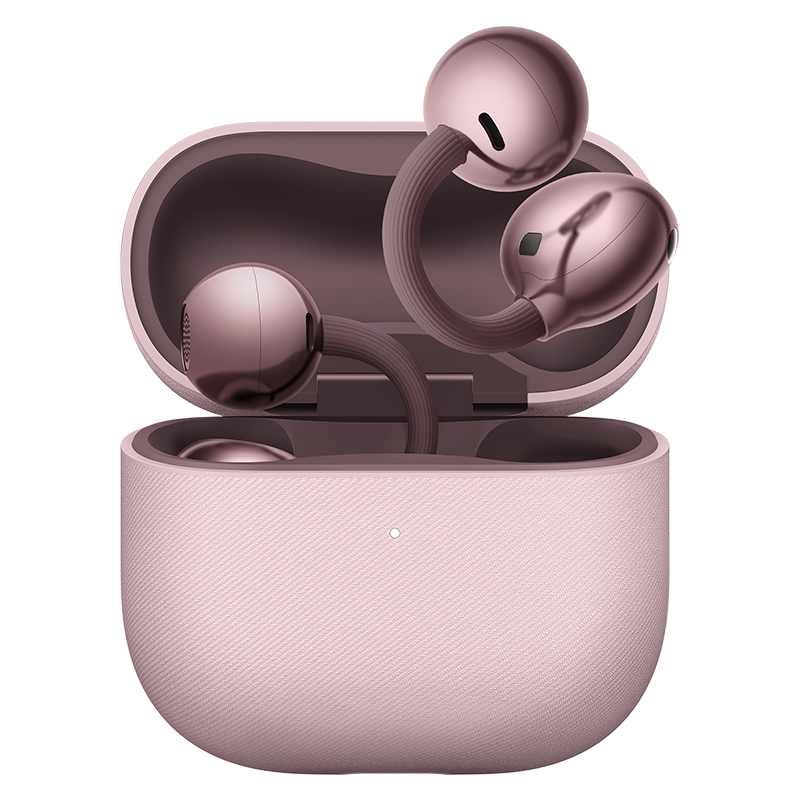
    HUAWEI FreeClip 2 open-ear clip-on earbuds

    HUAWEI FreeClip 2 Open-Ear Wireless Earbuds
    $188.00

    View product →

    What Does “Open-Ear” or “Clip-On” Actually Mean?

    Conventional wireless earbuds — from AirPods Pro to Sony’s WF series — seal off the ear canal with a silicone tip and, in many cases, add active noise cancellation (ANC). They create a private listening bubble, at the cost of shutting out the environment.

    Open-ear, clip-on earbuds take the opposite approach. They sit on the ear without sealing it. You get music, podcasts, or a phone call while still hearing traffic, train announcements, office chatter, a doorbell, or a colleague calling your name. There is no plugged-up pressure, and no need for a transparency mode, because nothing is blocked in the first place.

    This is exactly why the category is growing: for runners, cyclists, commuters, office workers, and anyone who dislikes the sealed-in feeling, the open design is the whole point. The trade-off is equally real — there is no passive isolation, so ambient noise stays audible, and bass has less impact in loud settings.

    HUAWEI FreeClip 2 Key Specifications

    Spec Detail
    Type Open-ear clip-on wireless earbuds (TWS)
    Driver 10.8 mm open dual-diaphragm dual-engine driver
    Chip 3rd-gen HUAWEI self-developed audio chip with NPU (claimed ~10x compute vs. 1st-gen)
    Codec L2HC (high-res support); Bluetooth 6.0
    Frequency response 20 Hz – 20 kHz
    Weight ~5.1 g per earbud
    Water / dust rating IP57 (earbuds)
    Fit C-bridge (C形桥) structure; liquid silicone over memory metal; claimed 25% softer than 1st-gen
    Battery 9 h per charge; up to 38 h with the 537 mAh case (60 mAh per bud)
    Fast charging ~10 min top-up adds about 3 h
    Calls 3-mic system with DNN noise reduction algorithm
    Smart features Adaptive volume, voice enhancement, spatial audio with head tracking (-40% latency), voice-assistant wake-up, head-gesture controls, real-time translation, NearLink find-my-case
    Left / right Symmetrical — either bud fits either ear, auto left-right detection

    Note on ratings: figures above are the manufacturer’s claims based on the international and CN specification sheets.

    Design & Comfort: The C-Bridge

    The FreeClip 2 is built from three parts: a “comfort bean” that rests behind the ear, a “listening ball” that sits in front of it, and a flexible C-bridge that connects them over the rim of the ear. The bridge is wrapped in skin-friendly liquid silicone over a memory-metal core, which Huawei says is about 25% softer than the original FreeClip. The comfort bean is also roughly 11% smaller than the previous generation.

    In practice this means the earbud is light (about 5.1 g) and stays put even when jogging or working out, while the clip tension is tuned to avoid a pinching sensation. Because the design is symmetrical, either earbud fits either ear — you do not have to find the “correct” one, and the earbuds automatically detect which side they are on. It also tends to leave enough room for people who wear glasses.

    The honest caveat: because a clip is a physical object on the ear, comfort is personal. Most reviewers find it comfortable for long sessions, but fit can change the sound slightly, and people who dislike anything resting on the ear may prefer a conventional earbud.

    Sound Quality & Features

    The FreeClip 2 uses a 10.8 mm open dual-diaphragm driver, and Huawei claims roughly double the loudness and double the low-frequency output of the first generation. Real-world reviews describe the tuning as balanced and clean: vocals are clear and forward, dialogue is natural, highs are crisp, and bass is present but controlled rather than boomy. In a quiet room, the FreeClip 2 can sound genuinely enjoyable — but it is still an open design, so loud environments will push you to raise the volume and bass will thin out first.

    The third-generation audio chip adds an NPU used for adaptive volume, voice enhancement, and spatial audio with head tracking (Huawei quotes a 40% latency reduction). The on-device AI also covers voice-assistant wake-up, head-gesture controls, smart announcements, and real-time translation, while NearLink helps you find a misplaced case.

    Call quality is a strong point for an open model: a three-microphone array with DNN noise reduction keeps voices clear in moderately busy settings and suppresses wind noise. In strong wind or heavy background noise, callers may still hear some clutter, which is the nature of an unsealed design.

    Battery Life & Charging

    Huawei rates the FreeClip 2 at up to 9 hours of listening on a single charge, and up to 38 hours with the 537 mAh charging case. A 10-minute top-up adds roughly three hours of playback. That endurance is well above what most clip-on rivals offer, and in daily mixed usage most users find a full day is more than enough, with the case topping up between sessions.

    Real-World Experience: Pros and Cons

    What reviewers consistently praise

    • Comfort for long sessions — the low weight and soft bridge mean no plugged-ear pressure.
    • Secure retention — the clip stays put even during running and workouts.
    • Situational awareness & safety — you hear traffic, announcements, and people around you outdoors.
    • Clear vocals and reliable calls — better than many open-ear models.
    • Strong open-ear bass — more low-end fullness than the first generation and many rivals.
    • Long battery life with a fast-charge cushion.

    The trade-offs to know before buying

    • No ANC — the open design cannot block out ambient noise; sealed earbuds win for isolation.
    • Limited bass outdoors — low-end impact drops when you raise the volume in noisy places.
    • Sound leakage — noticeable above roughly 70% volume in a quiet room, minimal at 50–60%.
    • Fit changes sound — because the earbud is not sealed, repositioning slightly alters the audio.
    • Premium price — this is a flagship clip-on, not a budget option.

    Who Should Buy It (and Who Shouldn’t)

    The FreeClip 2 is an excellent fit if you are any of the following:

    • Office workers who want background audio without ignoring colleagues.
    • Runners, walkers, and cyclists who need to stay aware of their surroundings.
    • Podcast and audiobook listeners who value clear speech and no plugged-ear feel.
    • People with sensitive ear canals who dislike deep silicone insertion.
    • Music listeners in quiet settings who want a premium, comfortable option.

    You should probably choose sealed ANC earbuds instead if you:

    • Fly often or commute on loud trains and buses and need isolation.
    • Want maximum bass impact and a private listening bubble.
    • Need lossless or high-resolution wireless audio with specific codec support.
    • Simply dislike anything resting on or around the ear.

    FreeClip 2 vs. Other Options

    Within the premium clip-on class, the closest rivals are the Bose Ultra Open Earbuds (around $299 / £299), the Shokz OpenDots One, and the Sony LinkBuds Clip. Compared with Bose’s much higher price, the FreeClip 2 can be the more compelling value inside the clip-on category; against Shokz and Sony it comes down to fit, sound, mic quality, and battery, so direct testing is the fairest judge. On the value end, options like the EarFun Clip 2 or SoundPEATS Clip1 get you the clip-on format for much less, but with compromises in refinement, call quality, and software depth.

    If isolation is your real priority, sealed ANC earbuds — such as the HUAWEI FreeBuds 7i or the HUAWEI FreeBuds Pro 5 — are the better choice for aircraft, trains, and bass-heavy listening. The trade-off is the closed pressure and reduced awareness.

    Where to Buy the FreeClip 2 (International Version)

    Huawei distributes the FreeClip 2 globally, but availability, warranty, and support differ a lot by region, and imported marketplace units can carry app limitations or counterfeit risk. At MadeInCN Shop we stock the genuine international version, which is what you want for reliable firmware and local-language support. If you are unsure whether open-ear is right for you, reach out before ordering — it is genuinely the wrong product for buyers who need noise isolation.

    FAQ

    Is the HUAWEI FreeClip 2 noise-cancelling?

    No. The FreeClip 2 is an open-ear design, so it does not seal the ear canal and has no active noise cancellation. Ambient sound stays audible, which is exactly what makes it good for awareness — but sealed ANC earbuds are the better choice for isolation.

    How long does the FreeClip 2 battery last?

    Huawei rates it at up to 9 hours of listening per charge and up to 38 hours with the charging case. A 10-minute top-up adds about three hours of playback.

    Is the FreeClip 2 waterproof?

    The earbuds carry an IP57 rating, meaning they are dust-tight and protected against immersion in water up to one meter. This suits running and everyday use, though it is not rated for swimming.

    Do the FreeClip 2 earbuds fit both ears?

    Yes. The design is symmetrical and automatically detects left or right, so either earbud can go in either ear. You can also control volume by swiping up or down on the comfort bean.

    Are the FreeClip 2 good for calls?

    Generally yes for an open-ear model. The three-microphone array with DNN noise reduction keeps voices clear in moderately noisy settings, though strong wind or heavy background noise can still cause some clutter.

    Is the FreeClip 2 available outside China?

    Yes. The standard model has reached international markets. Availability, pricing, and warranty vary by region, so it is important to buy from a source that provides a genuine international version with reliable support.

    Verdict

    The HUAWEI FreeClip 2 is one of the strongest clip-on open-ear earbuds you can buy for comfort, awareness, secure retention, call quality, and battery life. Its improvements over the first generation are practical: it is lighter, softer, smaller at the rear, longer-lasting, and more water-resistant. But the open format sets hard limits — no isolation, less bass outdoors, some leakage at high volume, and individual fit differences. Choose the FreeClip 2 when you want a refined open-ear experience; choose sealed ANC earbuds when you need to shut the world out.

    Want to try it? Grab the genuine international version at MadeInCN Shop.

    Related guides
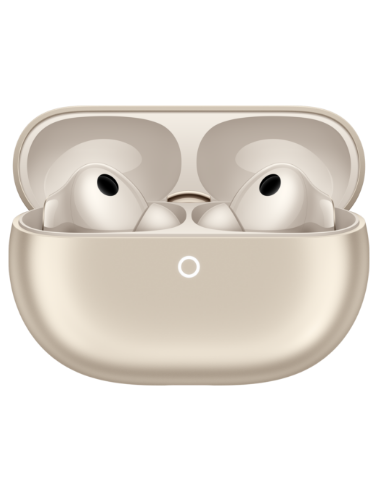
  • ESP32 Development Board Buying Guide (2026)

    Choosing the right ESP32 development board can save you weeks of prototyping time. This guide covers the specs that actually matter.

    ESP32-S3 development board with 4.3-inch IPS display

    ESP32-S3 Board with 4.3-inch IPS Display
    价格范围:.99 至 .99

    View product →

    1. MCU & Wireless

    Most boards use the ESP32-S3 with Wi-Fi and Bluetooth. Confirm the chip revision and whether you need Bluetooth LE for your project.

    2. PSRAM & Flash

    For display-heavy or AI workloads, 8MB PSRAM and 4MB Flash is a sweet spot. Our ESP32-S3 4.3″ IPS dev board ships with exactly that.

    3. Display & Antenna

    A built-in IPS panel with IPEX antenna support simplifies enclosures. Browse the full dev board collection for more options.

    We source genuine international-version boards and ship worldwide with tracked delivery.

    Related guides

Refer a friend — you both get US$5.0
MadeInCN Shop (长沙市熙麟电子商务有限公司)  ·  Est. 2022  ·  Reg. No. 91430104MABNHQAG6N  ·  岳麓区银盆岭街道岳麓大道89号香江国际1栋1412  ·  WhatsApp +86 16673109418  ·  madeincnshop@126.com  ·  Customer support: replies within 12h
MadeInCN is an independent reseller. HUAWEI and all other product names, logos and brands are the property of their respective owners and are used solely to describe the products offered.